
Imagine launching a high-budget native campaign on Monday that hits a 300% ROI, only to watch your Click-Through Rate (CTR) collapse into unprofitable territory by Thursday morning. This scenario is the nightmare of every high-volume media buyer.
The primary threat to scaling native ad campaigns isn’t bid competition, landing page speed, or offer changes. It is Ad Fatigue.
In high-competition Tier-1 markets (US, UK, Germany, Australia), target audiences develop visual immunity to native angles faster than ever. A winning headline and image combination now has an effective lifespan of just 48 to 72 hours. As soon as an ad reaches audience saturation, CTRs plummet, effective Cost Per Acquisition (eCPA) skyrockets, and ad network bidding algorithms demote your campaign in the publisher auction.
Until recently, surviving this burn rate required a team of graphic designers and copywriters producing dozens of manual banner variations daily.
That manual assembly line is officially obsolete.
Enter Dynamic Creative Optimization (DCO) 2.0—an AI-driven framework that modularizes, generates, tests, and auto-prunes thousands of native ad permutations in real time without human design intervention.
Below is an architectural breakdown of how DCO 2.0 functions, how to build policy-compliant generative prompt pipelines, and how to deploy automated multivariate testing engines to slash your eCPA by up to 45%.
1. What is DCO 2.0? The Modular Assembly Engine
Legacy DCO (DCO 1.0) was limited to basic dynamic text insertion—like swapping a city name into a static banner template (“Single homeowners in [City Name]”). While effective years ago, modern audiences immediately recognize these template hacks.
DCO 2.0 is a real-time, generative multimodal creative engine. Instead of uploading static, pre-rendered .jpg files to an ad network dashboard, you feed modular creative components into a dynamic rendering pipeline.
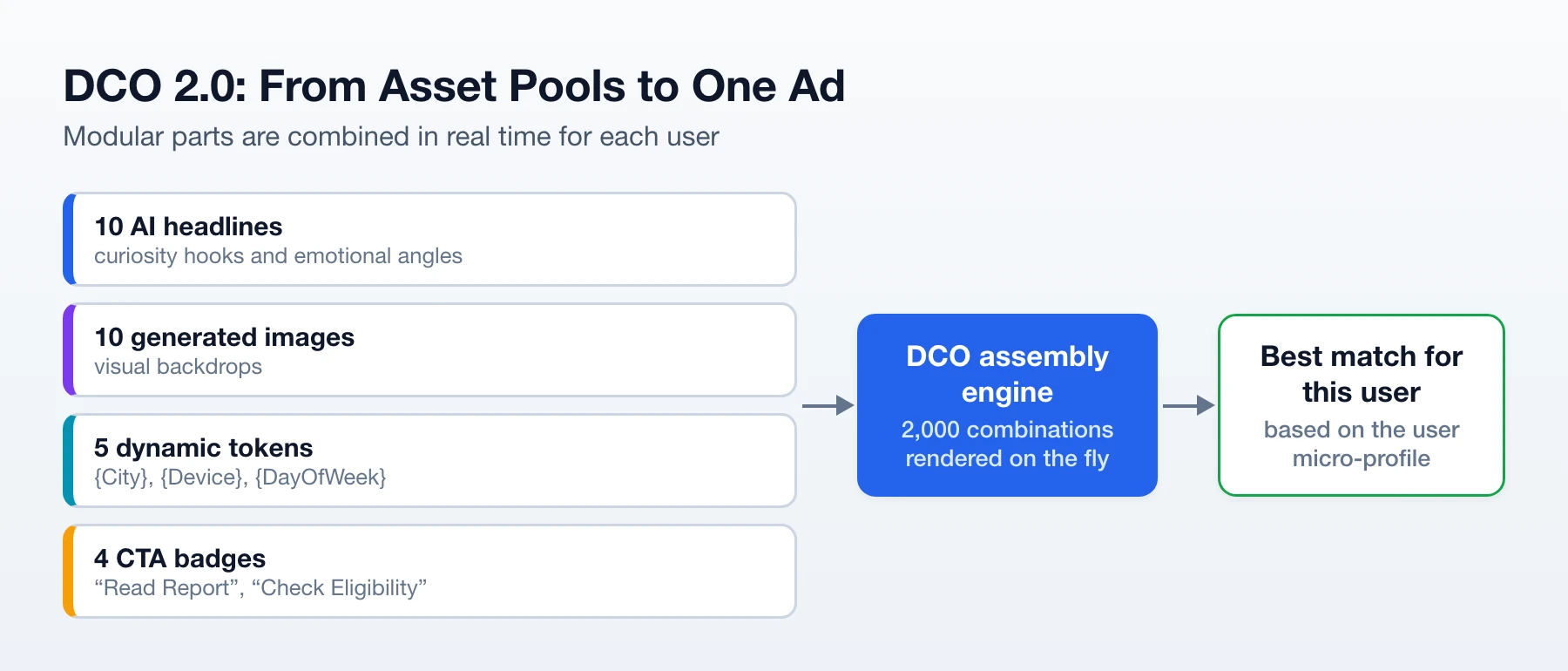
Real-Time Edge Rendering at Impression Time (< 15ms)
When an ad placement triggers on a premium publisher site (e.g., CNN, Bild, or Yahoo Finance), the GTaro Ads DCO engine intercepts the OpenRTB bid request and evaluates the user’s micro-profile:
- Contextual Signals: Article category (Finance, Health, Tech), publisher domain authority, user scroll velocity.
- Environmental Signals: Local weather, time of day, connection type (5G vs. Wi-Fi).
- Hardware Signals: Device brand (Apple, Samsung), OS version, screen aspect ratio.
In under 15 milliseconds, the engine selects the exact combination of headline, image, badge, and color palette that holds the mathematically highest conversion probability for that specific user, rendering the composite native unit at the edge.
2. Under the Hood: Generative API Pipeline Architecture
DCO 2.0 bridges generative AI tools with programmatic ad servers through API orchestrations. Instead of manually prompting AI tools, media buying teams connect local or cloud diffusion models (like FLUX, Midjourney API, or ComfyUI instances running Stable Diffusion) directly to their asset management platform.
The Automated Asset Generation Flow
- Prompt Matrix Generation: An LLM agent generates 20 distinct visual concepts based on successful psychological angles (e.g., Curiosity, Authority, FOMO, Local Relevance).
- API Asset Rendering: The system sends these prompts to a dedicated GPU cluster via API, rendering raw background images in a batch process.
- Automated Metadata Tagging: Computer vision models analyze the generated images, tagging them by lighting style (e.g., Daylight, Fluorescent, Macro), color dominant hex code, and subject type (e.g., Object, Document, Person).
- JSON Payload Assembly: The assets are indexed into a structured JSON configuration file that feeds the ad network’s creative server.
Sample DCO 2.0 Asset Payload (JSON):
{
  "campaign_id": "gt_native_fin_019",
  "dco_rules": {
    "auto_prune_threshold_impressions": 300,
    "target_ctr_floor": 0.012
  },
  "asset_pools": {
    "headlines": [
      "Why Homeowners in {City} Are Clearing This Setting in {Year}",
      "The Unnoticed {Device} Adjustment That Saves Thousands",
      "New Financial Policy Changes Take Effect Across {Region}"
    ],
    "image_backdrops": [
      "https://cdn.gtaroads.com/assets/raw_macro_document_01.webp",
      "https://cdn.gtaroads.com/assets/candid_table_setting_04.webp"
    ],
    "badges": ["Official Report", "Check Eligibility", "Updated Notice"]
  }
}
3. AI Prompt Engineering for Policy-Compliant Native Visuals
The primary driver of high CTR in native advertising is Editorial Realism—making the ad resemble a natural, intriguing news item rather than an aggressive commercial banner. However, major native ad networks strictly enforce compliance rules against graphic “before-and-after” images, fake celebrities, or misleading medical claims.
DCO 2.0 solves this by using generative models paired with Compliance-First Prompt Engineering.
4 Winning Visual Archetypes for Native Ads
Archetype A: The “Unfinished Curiosity” Object
Instead of showing a final result (which triggers ad policy violations), focus on an unusual, everyday macro object shot that creates an irresistible curiosity gap.
Prompt Framework:
Macro close-up photograph of an unusual household item resting on a wooden table, candid editorial photo style, shot on 35mm lens, natural harsh daylight, raw unedited news style, authentic texture, no text, no logos --ar 16:9
Archetype B: The Localized Editorial Scene
Images featuring authentic, ordinary individuals in realistic settings outperform studio photography by over 300%.
Prompt Framework:
Candid documentary photo of an ordinary 45-year-old worker sitting at a kitchen counter looking thoughtfully at a paper document, warm morning window light, realistic skin texture, neutral background, journalistic style --ar 16:9
Archetype C: Abstract Data & Scientific Visualization
Ideal for Finance, Crypto, and SaaS verticals. It signals high authority while avoiding explicit, non-compliant financial claims.
Prompt Framework:
Clean 3D render of a glowing minimalist network node structure overlaying a blurred financial office background, deep blue and emerald green palette, subtle lighting, professional editorial aesthetic --ar 16:9
Archetype D: The Regionalized Cultural Anchor
Matches regional aesthetics (e.g., suburban US vs. rural Germany vs. urban Japan) to increase immediate visual familiarity.
Prompt Framework:
An authentic street-level photograph of a quiet suburban residential driveway in [Region], overcast sky, realistic colors, candid shot, no people, editorial news style --ar 16:9
4. Mathematical Optimization: Thompson Sampling & Multi-Armed Bandits
Testing 2,000 creative permutations manually would drain your budget if impressions were distributed evenly. DCO 2.0 replaces traditional A/B testing with Multi-Armed Bandit (MAB) algorithms—specifically Thompson Sampling.
Unlike traditional A/B testing, which allocates 50% of traffic to a losing variation until “statistical significance” is reached, Thompson Sampling adjusts traffic distribution continuously based on probability distributions.
How Thompson Sampling Works Conceptually:
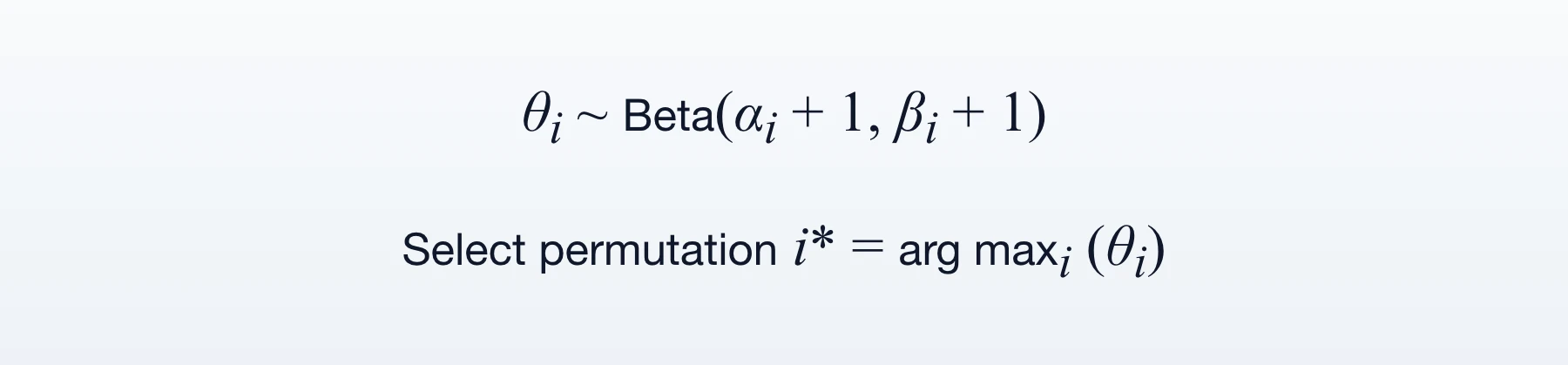
- Beta Distribution Modeling: For every creative permutation i, the engine maintains a probability distribution model Beta(αi, βi), where αi represents successful conversions (or clicks) and βi represents failures (impressions without conversion).
- Dynamic Sampling: For every incoming impression, the algorithm draws a random sample from the Beta distribution of all active permutations.
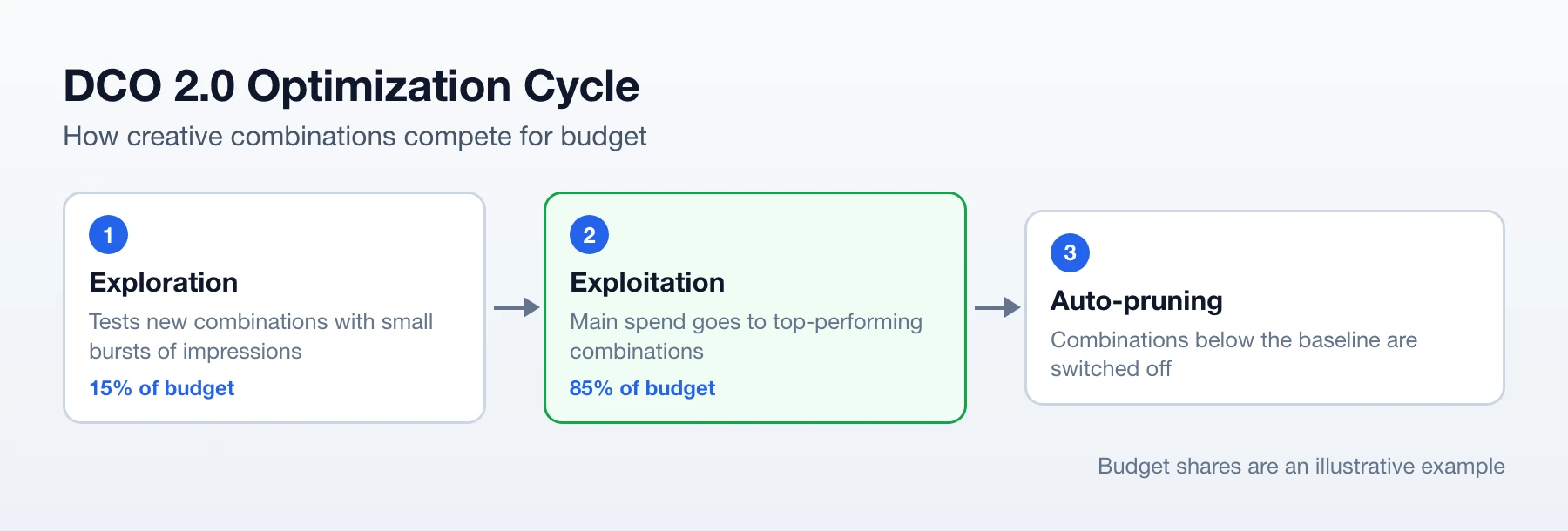
- Exploration vs. Exploitation Balance:
- Exploitation (85% Budget): Permutations with higher historical conversion rates draw higher values, winning the majority of impression auctions.
- Exploration (15% Budget): New or under-tested permutations still retain a mathematical chance of winning impressions, ensuring fresh creative angles are continuously evaluated.
Automatic Budget Protection Rules:
- The 300-Impression Floor: If a creative permutation receives 300 impressions without reaching a baseline CTR (e.g., > 1.1%), the algorithm caps its weight to zero, removing it from rotation.
- Downstream Conversion Weighting: When S2S postbacks report mid-funnel actions (
LeadorRegistration), the algorithm automatically shifts traffic away from high-CTR “clickbait” combos that fail to convert, reallocating spend to high-converting variants.
5. Case Study: Manual Testing vs. DCO 2.0 Engine
Below is a 30-day performance comparison for an enterprise Tier-1 Finance campaign generating 100,000 clicks per month.
| Metric | Manual Design & Testing | DCO 2.0 Automated Engine |
| Creatives Tested Monthly | 40 static banners | 2,500+ dynamic permutations |
| Design & Copy Costs | $4,500 / month | $0 |
| Average Campaign CTR | 1.12% | 2.82% (+151% Lift) |
| Creative Fatigue Onset | Every 3 days (Manual pause required) | Zero (Continuous auto-rotation) |
| Wasted Test Budget | $2,400 (Sunk into dead variations) | $180 (Cut off by MAB algorithm) |
| Effective CPA (eCPA) | $44.00 | $24.20 (-45% Reduction) |
| Net Campaign ROI | +58% | +218% |
By removing human bottlenecks in production and deploying algorithmic pruning, the campaign cut acquisition costs nearly in half while scaling monthly spend seamlessly.
6. Implementation Checklist for Media Buyers
Follow this technical roadmap to launch Dynamic Creative Optimization on your campaigns:
- [ ] Build Modular Asset Pools: Deconstruct your creative angles into individual building blocks: 10 headlines, 10 background images, 5 dynamic tokens (
{City},{Device}), and 3 CTA badges. - [ ] Inject Dynamic Tokens: Structure headlines with native network macros to maximize local relevance:
- “Why Homeowners in
{City}Are Reviewing This Setting in{Year}“ - “If You Own an
{Device}, Check This Setting Immediately”
- “Why Homeowners in
- [ ] Configure Multi-Event S2S Postbacks: Connect your tracker to send micro-conversion events (
ViewContent,Lead,Purchase) back to GTaro Ads so the DCO engine optimizes for downstream conversions rather than raw clicks. - [ ] Define Automated Campaign Rules: Establish hard safety rules in your dashboard:
- Disable creative permutation if CTR < 0.9% after 300 impressions.
- Increase bid by 15% on permutations yielding an eCPA 25% below the campaign target.
- [ ] Refresh Baseline Assets Weekly: While the DCO engine manages asset permutations, upload 5 to 10 new generative background concepts into your primary pool every week to maintain long-term visual diversity.
Conclusion
Relying on manual creative workflows in high-volume native advertising is a fast track to burned budgets and shrinking margins.
Dynamic Creative Optimization (DCO) 2.0 turns creative production into an automated, programmatic science. By combining generative image pipelines, modular asset assembly, and real-time algorithmic pruning, performance marketers can test thousands of compliant native angles daily, defeat creative fatigue, and scale campaigns effortlessly.
Stop wasting hours in image editors—let algorithmic assembly drive your native creative workflow with GTaro Ads!
FAQ
What is the main difference between DCO 1.0 and DCO 2.0?
DCO 1.0 was limited to basic dynamic text insertion (like swapping city names into static banner templates), whereas DCO 2.0 is a real-time, generative multimodal creative engine that builds, tests, and auto-prunes thousands of dynamic native ad permutations on-the-fly using AI and micro-profile data.
How does DCO 2.0 prevent ad fatigue in Tier-1 markets?
By continuously combining modular assets and using Multi-Armed Bandit algorithms, DCO 2.0 automatically rotates and optimizes creative elements at impression time, eliminating the 48-to-72-hour burn rate common with static banner ads.
What is Thompson Sampling and how does it optimize ad spend?
Thompson Sampling is a Multi-Armed Bandit algorithm that uses Beta distributions to balance exploration (testing new or under-tested creative permutations with a small budget) and exploitation (allocating the majority of traffic to proven, high-converting variations).
How does the automated budget protection rule work?
The system enforces a strict impression floor (e.g., 300 impressions). If a creative permutation fails to hit the minimum baseline CTR threshold, the algorithm instantly caps its weight to zero and removes it from active rotation to save wasted budget.
Are the generated native visuals compliant with ad network policies?
Yes. DCO 2.0 uses Compliance-First Prompt Engineering to generate editorial-style, non-promotional imagery—such as abstract data visualizations, macro close-ups, and candid documentary photos—that bypass restrictive network rules against misleading claims or sensationalist banner ads.
What kind of performance lift can media buyers expect from DCO 2.0?
By automating asset creation and algorithmic pruning, campaigns typically see up to a 151% increase in CTR, a 45% reduction in effective CPA (eCPA), and a massive boost in net campaign ROI.
How often should new baseline assets be refreshed in a DCO 2.0 campaign?
While the automated engine continuously manages and optimizes permutations, media buyers should upload 5 to 10 new generative background concepts into the primary asset pool on a weekly basis to ensure long-term visual freshness