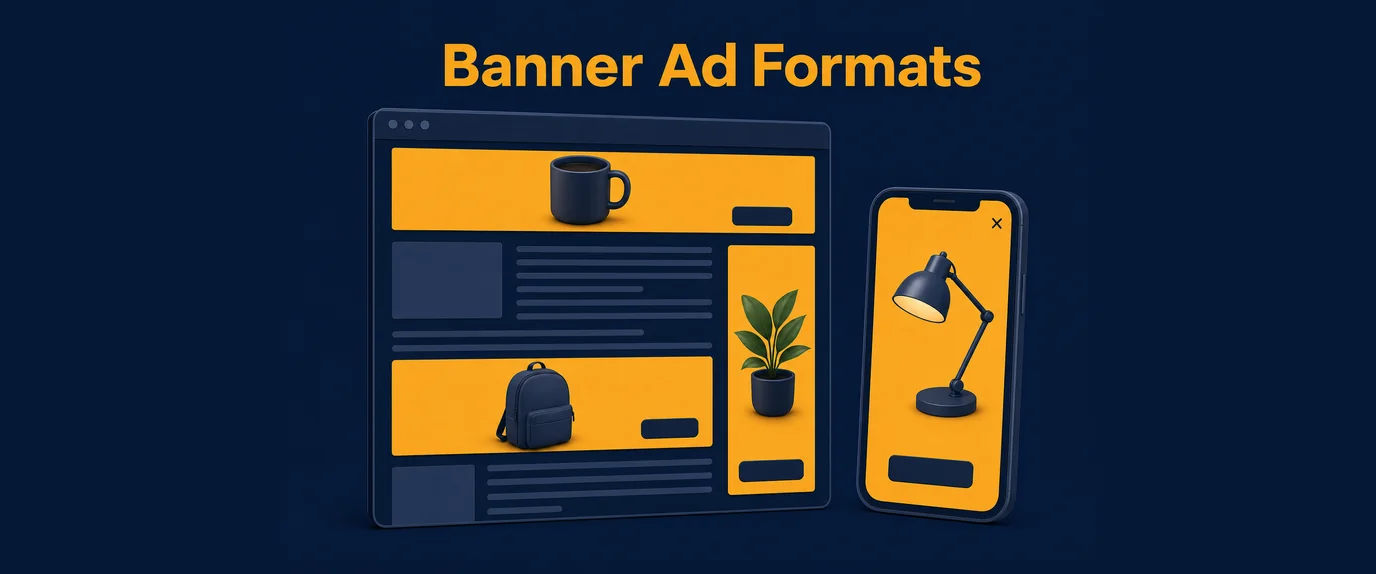
Leaderboard, skyscraper, rectangle, and mobile interstitial are the four core banner ad formats defined by the IAB, each built for a specific page location and screen type. Leaderboards run horizontal across headers, skyscrapers run vertical in sidebars, rectangles sit inline within content, and interstitials cover the full mobile screen at transition points. This guide covers exact specs, placement rules, and performance notes for each.
Format specifications at a glance
Before diving into each format individually, here is the full spec sheet for reference.
| Format | Standard size (px) | Orientation | Typical placement | Device |
|---|---|---|---|---|
| Leaderboard | 728×90 | Horizontal | Top/bottom of page | Desktop |
| Skyscraper (wide) | 160×600 | Vertical | Sidebar | Desktop |
| Skyscraper (standard) | 120×600 | Vertical | Sidebar | Desktop |
| Medium rectangle (MREC) | 300×250 | Rectangular | In-content, sidebar | Desktop & mobile |
| Mobile interstitial | Full screen (variable) | Full screen | Transition points | Mobile |
Each row above corresponds to a distinct section below — including exact use cases, placement logic, and design constraints.
Leaderboard: 728×90
A leaderboard banner is a horizontal ad unit measuring 728×90 pixels, positioned at the top of a webpage, typically above or directly below the main navigation bar. It’s one of the oldest standardized IAB ad sizes still in wide use.
Placement rules:
- Above-the-fold placement (top of page, before scrolling) delivers the highest viewability for this format.
- A second leaderboard can be placed at the footer, though footer viewability is notably lower.
- The format requires a minimum content width of roughly 728px to avoid horizontal scroll or layout breaking on smaller desktop screens.
Design constraints: the 90px height leaves limited vertical space, so leaderboard creatives typically rely on a single strong visual plus a short headline rather than dense copy.
Performance note: leaderboard CTR tends to be moderate but stable, and the format is frequently used for brand awareness and retargeting campaigns rather than direct-response offers requiring detailed copy.
Skyscraper: 160×600 and 120×600
A skyscraper banner is a tall, narrow vertical ad unit designed for page sidebars, most commonly built at 160×600 pixels (wide skyscraper) or 120×600 pixels (standard skyscraper).
Two things distinguish this format from the others:
- Extended visibility during scroll. Because sidebars often use sticky or fixed positioning, a skyscraper can remain visible as the user scrolls through the main content — unlike a leaderboard, which scrolls out of view once the user moves past it.
- Vertical layout constraints. The narrow width (120-160px) rules out dense horizontal copy, pushing creative design toward a stacked layout: logo or headline at top, visual in the middle, call-to-action at the bottom.
Where it fits: skyscrapers work well on content-heavy sites with a persistent sidebar — blogs, forums, and news sites — where the format can stay in view for the length of an entire article read.
A layout caveat: as more sites move to responsive, mobile-first designs without fixed sidebars, skyscraper inventory has become concentrated on desktop-only traffic, which is worth factoring into campaign planning if a large share of traffic is mobile.
Medium rectangle (MREC): 300×250
A medium rectangle, commonly abbreviated MREC, is a 300×250 pixel ad unit and one of the most universally supported banner sizes across both desktop and mobile web inventory.
What makes the MREC different from the two formats above:
- It fits inline within content, not just in headers or sidebars — commonly placed between paragraphs of an article, similar in spirit to in-content native placements.
- It works at both desktop and mobile widths, since 300px fits comfortably within most mobile screen widths without requiring a separate mobile-specific size.
- Its near-square proportions allow for richer visual layouts than the leaderboard or skyscraper, including product shots with copy overlays.
Performance note: the MREC is frequently cited across ad-tech benchmarks as one of the higher-performing standard IAB sizes, largely because in-content placement puts it directly in the user’s natural reading path rather than in peripheral page zones.
Mobile interstitial: full-screen format
A mobile interstitial is a full-screen ad that appears at a natural transition point within a mobile app or mobile site — between game levels, after completing an action, or during a page-to-page navigation — rather than sitting within a fixed page slot like the three formats above.
Key mechanics:
- The ad covers the entire screen, temporarily blocking interaction with the underlying app or page.
- A close button (usually an “X”) appears after a short mandatory delay, typically 3-5 seconds, in line with major ad network and app store policies.
- Because of the full-screen size, interstitials support richer creative than any other banner format — video, animation, or large static images.
Why timing matters more here than in any other format: an interstitial triggered mid-task (interrupting active gameplay, for example) generates far more user frustration than one triggered at a natural pause point (after a level ends, before the next screen loads). Poor timing is consistently one of the top drivers of accidental-click complaints and app uninstalls tied to interstitial placements.
Comparison with popunder: both formats are full-attention, high-visibility units, but they operate differently — a popunder opens behind the active window on desktop and is discovered later, while a mobile interstitial takes over the screen immediately and demands an instant response.
Choosing between the four formats
| Decision factor | Best-fit format |
|---|---|
| Fixed header/footer slot on desktop | Leaderboard |
| Persistent sidebar on content-heavy pages | Skyscraper |
| Space needed inside article text or on any screen size | Medium rectangle |
| Full-screen mobile transition point | Mobile interstitial |
| Need maximum creative richness (video, animation) | Mobile interstitial |
| Need format that works identically desktop + mobile | Medium rectangle |
A single campaign rarely relies on just one of these. A typical setup pairs a leaderboard for top-of-page branding, an MREC for in-content direct response, and — on mobile inventory — an interstitial at natural app transition points, each targeted through the appropriate inventory.
Buying and serving banner inventory
Banner formats are typically bought and optimized through the same infrastructure used for other formats. RTB platforms allow real-time bidding across all four sizes simultaneously, adjusting spend toward whichever format is delivering the strongest return for a given campaign. On the supply side, publisher accounts generally configure all standard sizes within a single ad tag setup, while advertiser accounts can target specific sizes or leave targeting open across the full set.
For mobile-specific interstitial delivery within apps, integration is commonly handled through an Android SDK, which manages full-screen ad timing, close-button delays, and compliance with platform policy automatically. Campaigns that need a single creative to route across multiple offers based on device or context — desktop banner vs. mobile interstitial, for instance — often layer in smartlink advertising on top of standard banner buys.
Frequently Asked Questions
What is the standard size of a leaderboard banner ad? 728×90 pixels, placed horizontally at the top or bottom of a desktop webpage.
What size is a skyscraper banner ad? Most commonly 160×600 pixels (wide) or 120×600 pixels (standard), placed vertically in a page sidebar.
What is a medium rectangle ad size? 300×250 pixels — one of the most widely supported sizes, usable inline in content on both desktop and mobile.
What is a mobile interstitial ad? A full-screen mobile ad shown at natural transition points, such as between game levels, usually with a close button appearing after a short delay.
Which banner format has the best CTR? Mobile interstitials tend to record the highest CTR due to their full-screen size, though they also carry a higher risk of accidental clicks.
Can one banner creative be used for multiple ad sizes? No — each size needs its own creative built to the exact dimensions, since resizing a single asset causes distortion and hurts performance