What is Postback (S2S) and Why Do You Need It?
Postback (Server-to-Server) is a method of sending conversion data directly from the affiliate network’s server to your tracker’s server.
Unlike the good old pixels (Client-side), which rely on the user’s browser, cookies, and AdBlocks, S2S works “behind the scenes.” A user can close the page, clear their cache, or use a secure browser—if the network’s server records a lead, your tracker will know about it.
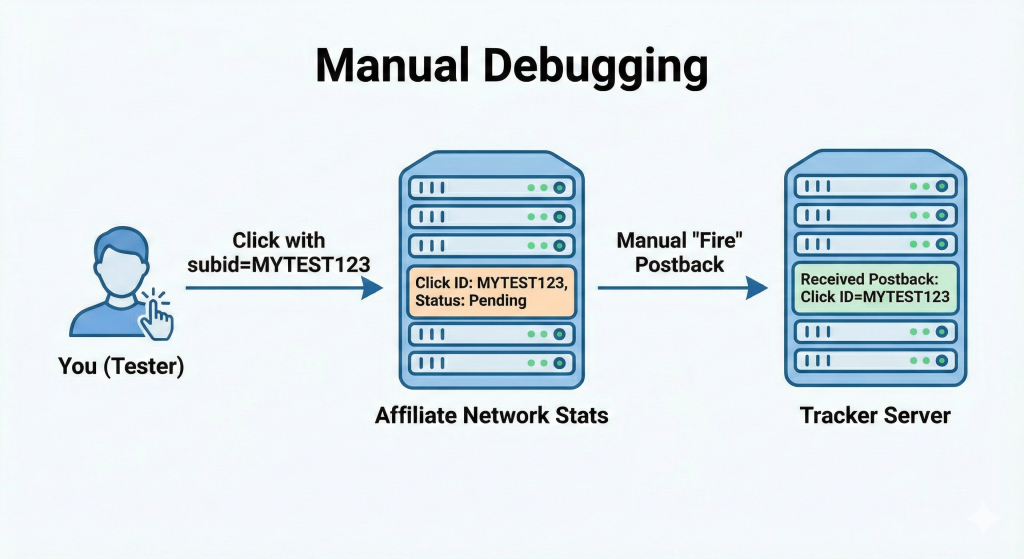
How it works (The Simple Version):
- The Click: A user clicks your ad.
- The ID: Your tracker generates a unique click_id and passes it to the affiliate network via the URL.
- The Action: The user makes a deposit/buys a product/registers.
- The Ping: The network’s server takes that click_id and sends it back to your tracker via a special link (Postback URL).
- The Profit: Your tracker matches the ID and shows you that sweet green number in your stats.
Step-by-Step Setup: From Offer to Tracker
Let’s follow the classic path: Traffic Source -> Tracker (Keitaro/Binom/etc.) -> Affiliate Network.
1. Preparing the Link in the Tracker
Create a campaign in your tracker. The most important part is passing the unique click identifier to the affiliate network. Usually, this is done through parameters like subid, aff_sub, or clickid.
Link Example:
https://offer_link.com/?aff_sub={subid}Here,
{subid}is the tracker’s macro, which will turn into a unique string of characters (e.g.,12345abc).
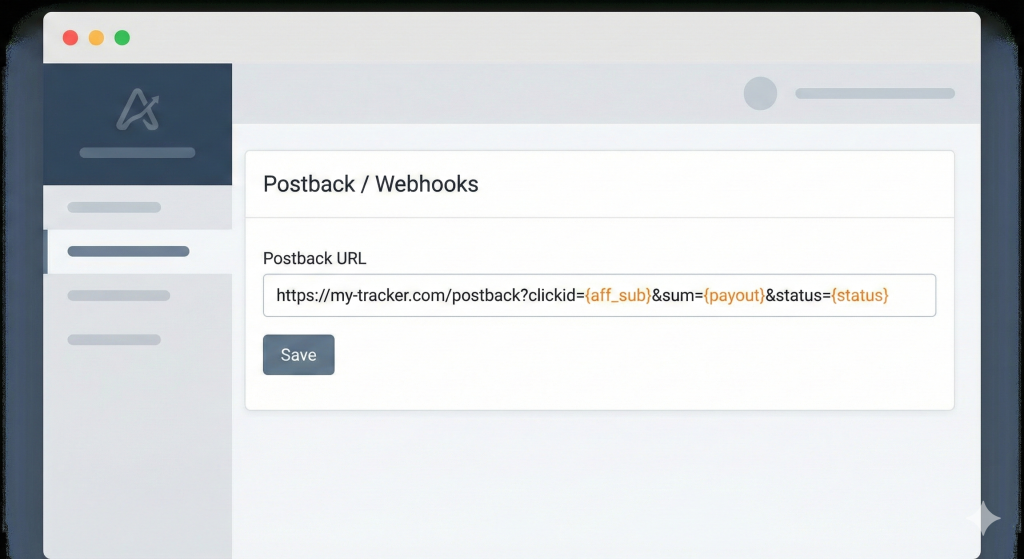
2. Configuration in the Affiliate Network
Go to the network’s dashboard and find the Postback / Webhooks section. You need to paste the Postback URL from your tracker here.
The Golden Cheat Sheet: Top 5 Beginner Mistakes
Even experienced buyers mess up the basics sometimes. Double-check these:
- Macro Mismatch: You passed the click in
subid1, but the network is trying to return it via{subid2}. The data won’t match, and the conversion won’t show up. - Extra Spaces or Special Characters: A single extra question mark or ampersand (
&) in the link can break the whole URL. - HTTPS vs HTTP: If your tracker uses SSL (https) but you wrote the postback as http, some servers might block the data transfer.
- Conversion Statuses: You forgot the status macro. As a result, registrations, deposits, and declines all get lumped together in your tracker.
- Skipping the Test Lead: The silliest mistake is launching traffic without manually checking the lead path first.
Debugging: What if the Conversions Aren’t Showing Up?
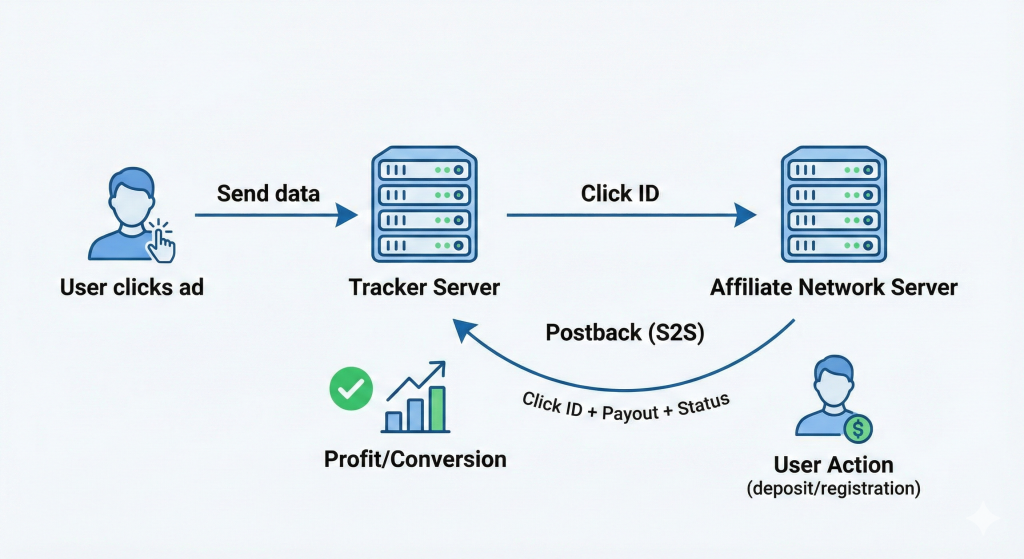
If the network shows leads but your tracker shows “zero,” follow this algorithm:
Step 1: Check Tracker Logs
Any decent tracker has a “Postback Logs” or “Received Postbacks” section.
- If the log is empty: The network isn’t sending anything at all (talk to your AM).
- If the log shows
Click ID not found: You’re passing one ID to the network, but it’s returning a different one (or none at all).
Step 2: Manual Check (Hardcore Mode)
Take your offer link and replace the {subid} macro with any word, like MYTEST123.
- Follow the link yourself.
- Make sure a click with
subid = MYTEST123appears in the network’s stats. - Ask your affiliate manager to “fire” the postback manually for that specific click.
Summary
Postbacks aren’t just technical; they’re precision tools that protect your budget and campaign performance. A well-configured S2S (server-to-server) postback ensures accurate tracking, reduces lost conversions, and prevents revenue leakage. Mistakes in templates or macro mapping can cost thousands and waste weeks of optimization.
The key to mastering postbacks is attention to detail and systematic verification. Always double-check macros against your tracker, test thoroughly before going live, and don’t hesitate to involve network support when something seems off. Consistent diligence turns postbacks from a headache into a reliable backbone of your affiliate campaigns.
Postback Setup & Verification Checklist
| Step | Action | Purpose |
|---|---|---|
| 1 | Verify network macros | Ensure correct data is captured |
| 2 | Map macros to tracker | Avoid mismatched or missing conversions |
| 3 | Configure S2S template | Prevent data loss or duplication |
| 4 | Run test conversions | Detect errors before scaling |
| 5 | Monitor real-time postbacks | Catch anomalies early |
| 6 | Involve support if needed | Resolve unclear issues quickly |
FAQ
What is a postback in affiliate marketing?
A postback is a server-to-server signal that tells your tracker when a conversion occurs, ensuring accurate tracking and proper attribution.
Why do postbacks fail?
Common reasons include incorrect macro mapping, missing parameters, template errors, or network-side misconfigurations.
How can I test if my postback is working?
Use test conversions in a controlled environment and verify that the tracker receives the expected parameters and conversions.
Can I rely solely on network reporting without postbacks?
No. Network reporting may lag or miss conversions. S2S postbacks provide real-time, reliable tracking for accurate campaign decisions.
Should I contact support if a postback seems broken?
Absolutely. Support teams are equipped to troubleshoot template issues or macro mismatches—don’t try to fix everything alone.