Short answer: Include {postbackid} in your campaign's "Redirect URL". Capture the value your tracker receives and, on conversion, send a GET request to https://gtaroads.net/postback?id= with that received value after id=. Do not send the literal macro back as the conversion ID.
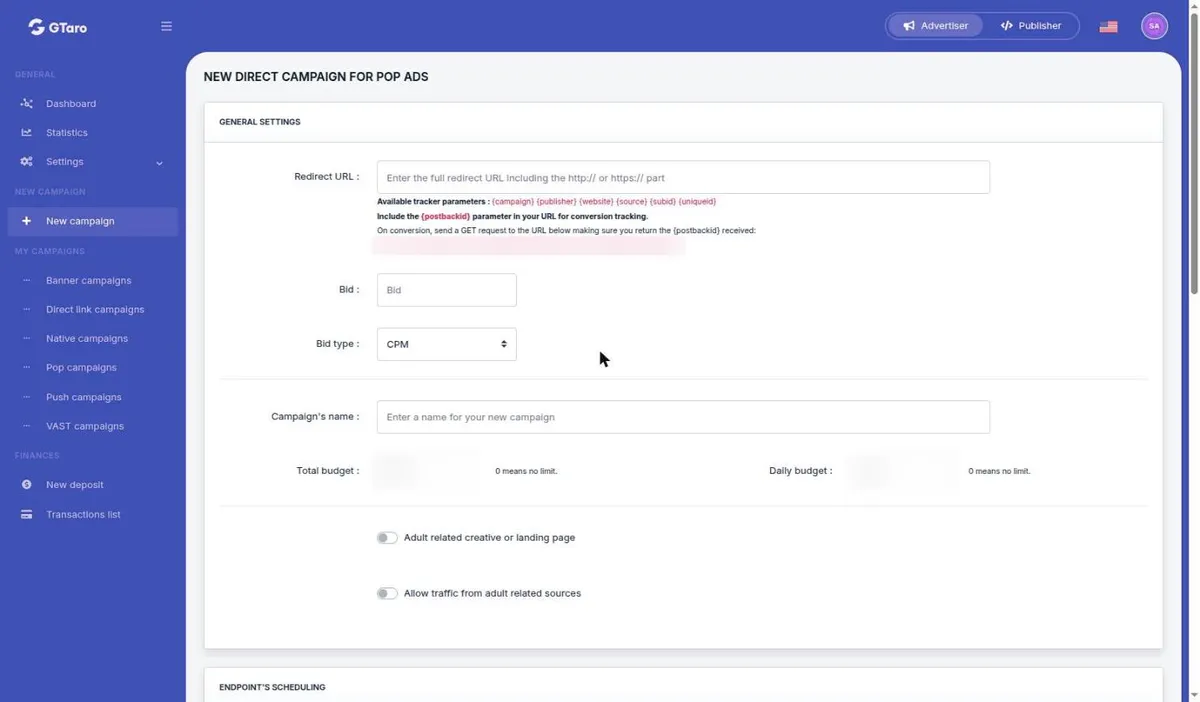
The form tells you to include {postbackid} in your URL for conversion tracking. On conversion, it instructs you to send a GET request and return the {postbackid} received. It gives this destination:
text
https://gtaroads.net/postback?id={PASS_THE_POSTBACKID_HERE}
The text after id= is an instruction to insert the received value, not a literal value to transmit. These instructions appear on the pop campaign form. For other formats, ask support how conversion tracking is configured.
{postbackid} in the URL parameter that your tracker uses to receive and store the external identifier. Keep the macro exactly as shown, including its braces.The campaign form also lists {campaign}, {publisher}, {website}, {source}, {subid} and {uniqueid} as available tracker parameters. Its conversion instruction specifically requires {postbackid}; do not substitute one of these other parameters for it.
Configure your tracking system to send an HTTP GET request to https://gtaroads.net/postback?id= followed by the stored value received through {postbackid} for that conversion. Use the actual received value, rather than the macro text or the placeholder in the displayed destination.
The Redirect URL passes the identifier to your tracking system; the conversion request returns that identifier to GTaro Ads. These are the two directions of the form's instruction.
For the rest of the pop form, read how to create an advertising campaign.
Under section 5.5 of the Terms, you are responsible for configuring postbacks, pixels and other tracking correctly. Conversions not reported correctly are not counted. Section 7.2 also prohibits manipulating tracking, postbacks or conversions.
If the receiving tracker parameter, stored value or outgoing request is unclear, write to support with your configuration question. Ask support to help before you rely on the integration.


